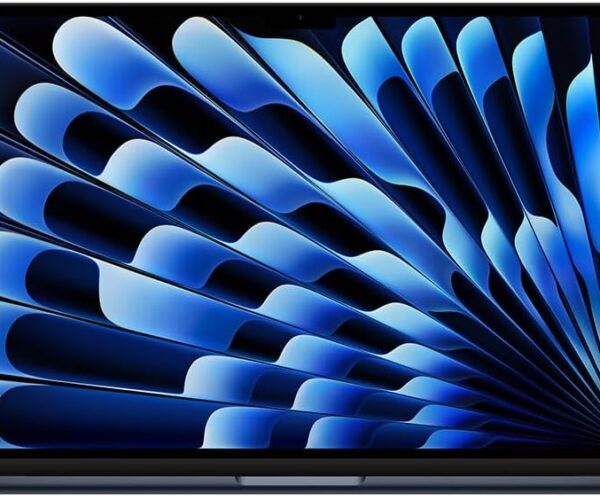
Apple’s M3 chip has landed in the ultraportable MacBook Air, while Dell’s XPS 15 remains the gold standard for Windows creators. But these two laptops serve very different users.
In this head‑to‑head comparison, we’ll break down performance, display, battery life, portability, and value to help you decide which one deserves your money.
Quick Verdict (Skip to the end if you’re in a hurry)
-
Choose the MacBook Air M3 if you want all‑day battery, silent operation, and macOS for everyday productivity or light creative work.
-
Choose the Dell XPS 15 if you need a dedicated GPU, a larger screen, Windows‑only software, or upgradeable components.
Now let’s dive into the details.
1. Specs at a Glance
| Feature | MacBook Air M3 | Dell XPS 15 (2025 model) |
|---|---|---|
| Processor | Apple M3 (8‑core CPU, 10‑core GPU) | Intel Core Ultra 7 155H / Ultra 9 185H |
| RAM | 8GB – 24GB unified | 16GB – 64GB DDR5 |
| Storage | 256GB – 2TB SSD | 512GB – 8TB SSD (two M.2 slots) |
| Display | 13.6″ Liquid Retina (2560×1664) | 15.6″ OLED (3456×2160) or IPS |
| Graphics | Integrated (up to 10‑core) | Up to NVIDIA GeForce RTX 4070 |
| Weight | 1.24 kg (2.7 lbs) | 1.96 kg (4.3 lbs) |
| Ports | 2x USB‑C / Thunderbolt, headphone jack | 3x USB‑C / Thunderbolt, SD card slot, headphone jack |
| Battery life | ~15‑18 hours | ~8‑10 hours |
2. Performance: M3 Efficiency vs. Intel + NVIDIA Power
MacBook Air M3
The M3 chip is a marvel of efficiency. For everyday tasks – web browsing, Slack, Spotify, light 4K video editing – the Air never stutters. It has no fan, so it’s completely silent. However, under sustained heavy load (e.g., rendering a 30‑minute video), it will throttle to keep temperatures down.
Best for: Writers, students, office work, photo editing, light video editing.
Dell XPS 15
With up to an Intel Core Ultra 9 and an RTX 4070, the XPS 15 crushes multi‑threaded workloads. You can edit 8K video, run local AI models, or game at 1080p. The active fans do spin up, but performance remains consistent.
Best for: Video editors, 3D modeling, data science, Windows gaming, software development.
Winner: Dell XPS 15 for raw power. MacBook Air for silent, efficient everyday use.
3. Display & Portability
-
MacBook Air M3: The 13.6″ Liquid Retina display is bright (500 nits) and color‑accurate. It’s a joy to work on in coffee shops or airplanes. The laptop is incredibly thin – you’ll forget it’s in your bag.
-
Dell XPS 15: The 15.6″ OLED option is stunning – perfect blacks, 100% DCI‑P3, and a 16:10 aspect ratio. But the laptop is larger and heavier. If you need a big screen without an external monitor, the XPS wins.
Winner: Tie – Air for portability, XPS for screen real estate.
4. Battery Life (Real‑World Test)
-
MacBook Air M3: Easily lasts a full workday (8+ hours) with Chrome, Spotify, and Zoom. In light use, expect 15–18 hours.
-
Dell XPS 15: With the OLED screen and dedicated GPU, you’ll get 6–8 hours of mixed use. Heavy tasks drop that to 3–4 hours.
Winner: MacBook Air M3 by a landslide.
5. Ports & Expandability
-
MacBook Air M3: Only two USB‑C ports (both used for charging and peripherals). You will need a dongle for HDMI, USB‑A, or SD cards.
-
Dell XPS 15: Three USB‑C ports, a full‑size SD card slot (crucial for photographers), and a headphone jack. Plus, you can upgrade RAM and storage later.
Winner: Dell XPS 15 – no contest.
6. Price & Value
| Configuration | Approximate Price |
|---|---|
| MacBook Air M3 (8GB / 256GB) | $1,099 |
| MacBook Air M3 (16GB / 512GB) | $1,399 |
| Dell XPS 15 (Ultra 7 / 16GB / 512GB / Intel Arc) | $1,499 |
| Dell XPS 15 (Ultra 7 / 32GB / 1TB / RTX 4060) | $2,199 |
The MacBook Air is more affordable at entry level, but the base model’s 8GB RAM and 256GB SSD are tight for 2026. The Dell costs more but offers a dedicated GPU and upgradeable parts.
Winner: MacBook Air for budget buyers. Dell XPS for professionals who need future‑proofing.
7. Which One Should You Buy?
Buy the MacBook Air M3 if:
-
You mostly use web apps, Office, or creative cloud lightroom.
-
You carry your laptop everywhere and hate heavy chargers.
-
You prefer macOS over Windows.
-
You want a fanless, silent laptop.
Buy the Dell XPS 15 if:
-
You edit video, render 3D, or run virtual machines.
-
You need an SD card slot and upgradeable RAM/SSD.
-
You want to play games occasionally.
-
You need Windows for specific software (e.g., SolidWorks, Visual Studio).
Final Recommendation for sacada2.net readers
For 90% of people who just want a fast, portable, long‑lasting laptop: Get the MacBook Air M3. It’s the best ultraportable of 2026.
For creators and power users who need desktop‑level performance in a laptop: Spend more on the Dell XPS 15 – it’s a workstation in disguise.
Looking for the best deal? Compare live prices:
Related articles on sacada2.net:
-
How to extend battery life on Windows laptops
-
MacBook Air M3 vs. MacBook Pro M3: which one to buy?